NCR VOYIX ALOHA INTEGRATION

Black Box Intelligence & NCR Aloha Integration

Black Box Intelligence’s integration with NCR VOYIX’s Aloha point of sale and management system helps restaurant teams improve food and service execution, operate more efficiently, and create better customer experiences.
Black Box Intelligence logo above NCR Voyix logo, separated by a plus sign, on a light grid background, highlighting Aloha Integration.

How NCR Aloha Integrates with BBI

A bold white number 1, symbolizing Airship Integration, is centered inside a solid purple circle on a light gray background.

Aloha sends menu items ordered (and server information if applicable) to BBI Survey Studio.
Logos for NCR Voyix and Black Box Intelligence are shown, with a purple downward arrow between them, indicating an Aloha Integration partnership.

At the end of their experience, customers provide feedback using our 1-Minute Smart Survey.
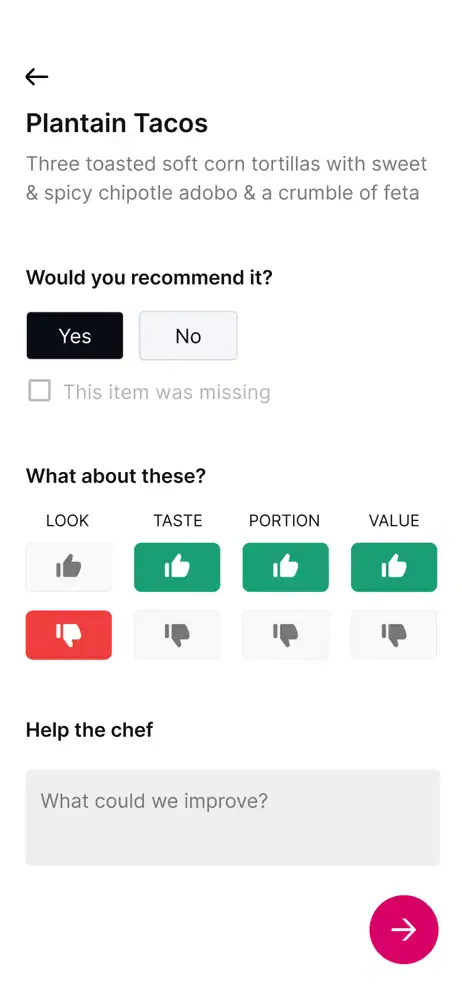
A restaurant review screen for Plantain Tacos featuring Aloha Integration, with options to recommend the item (Yes/No), rate look, taste, portion, and value using thumbs up or down, plus a text box for improvement suggestions.

BBI provides actionable insights based on feedback received to help drive satisfaction growth.
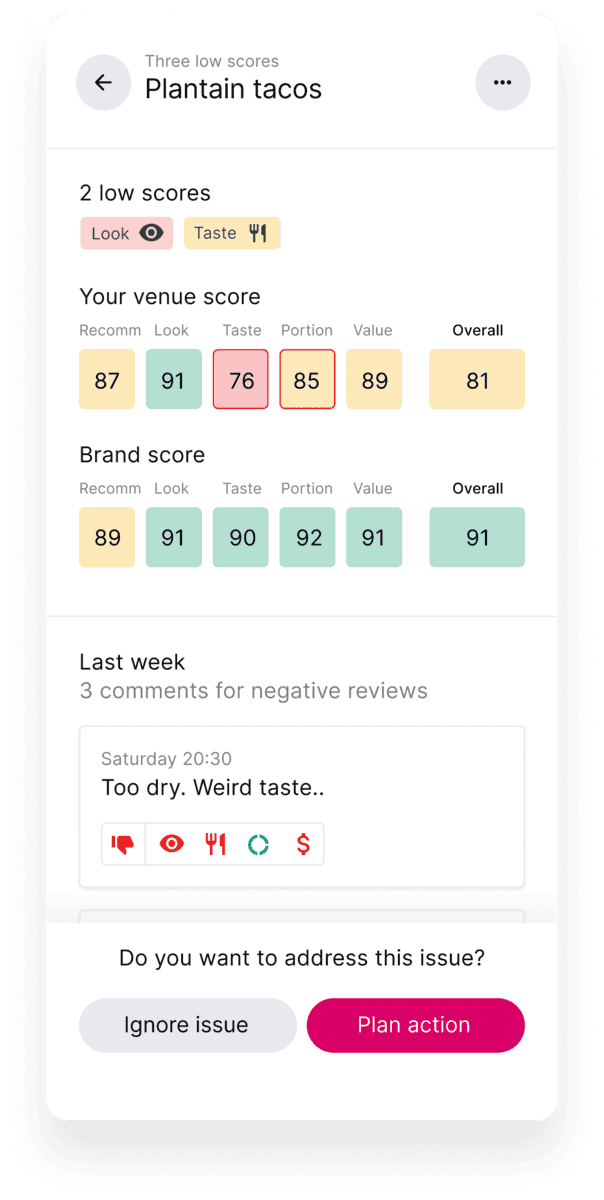
A review dashboard with Aloha Integration for plantain tacos shows "low scores" in Look and Taste. Venue scores range from 76 to 91, brand scores from 89 to 91. A negative comment says, "Too dry. Weird taste." Options to "Ignore issue" or "Plan action" are shown.

Fast Path to Real-Time Menu Feedback

Collect guest feedback from all on-premise, delivery and off-premise orders via devices, post-dine emails and/or QR codes.

A group of five simple black outlined people with three purple outlined stars above them on a light background, symbolizing teamwork and redcat integration.

Up to 70% of customers leave a review of their experience, without incentivization.

Smart Surveys capture feedback on actual items ordered and uncover the ‘why’ behind every customer experience.

This integration offers digital check capability and pay-at-table options.

BBI Integrations

Our Technology Integration Network

Overview
High-level view of all the platforms we integrate with.
Two overlapping purple speech bubbles, one featuring a star and lines representing text, and the other with a bookmark symbol and lines, on a dark background.
Reviews & Social
Review, social media and communication technologies for feedback management.
Purple outline icon of a computer monitor displaying the letters "CRM," with a gear symbol partially overlapping the top left corner, representing CRM software settings or configuration.
Loyalty & CRM
Loyalty and customer relationship management platforms.
Purple line drawing of a payment terminal with a dollar bill being inserted and a card slot on the side, representing electronic financial transactions.
PoS
Direct integrations with Point of Sale systems.

REQUEST A DEMO

Learn More

Find out how leading hospitality brands are discovering their path to growth by managing, tracking, and influencing the end-to-end customer experience with BBI.

[BBI-CP v17] Initializing...
// which jQuery executes when appended to #gform_24, redefining // window.gformRedirect to a NEW closure. Our v14 wrapper is gone, then // the very next line calls gformRedirect() and the page navigates BEFORE // the user can interact with the CP modal. // // v15 fixes: // 1. Hard-lock window.gformRedirect with non-configurable defineProperty // that ignores ALL writes once flowActive=true. // 2. Wrap jQuery $.fn.append on the gform_24 wrapper to STRIP