Restaurant Survey Best Practices
The Anatomy of a Great Restaurant Survey Question

Introduction: Score AND Solution
Before you write a single question for your next guest survey, you must answer one of your own: What is this survey actually for?
Is it a report card designed to give you a grade? Or is it a diagnostic tool designed to give you a plan?
In the current landscape of hospitality, most brands suffer from a specific paradox: they have “too much data and not enough answers”. They see a guest sentiment score of “8/10” or “nines across the board,” yet their traffic is down and sales are flat. This disconnect occurs because traditional surveys focus on the score—a retrospective grade of how the guest felt—rather than the diagnosis of what actually happened.
To be clear, guest emotion is super important and you need to know what your guests truly think about their experience. But you also need to know why.
If your goal is to simply pat yourself on the back, a score is fine. But if your goal is to increase key restaurant financial metrics, a score alone is unlikely to be meaningfully impactful.
You need “maps AND grades”; in other words, you need to move beyond simple sentiment to show exactly how guest experiences are impacting your bottom line, so you can focus on the opportunities that actually move the needle.
The anatomy of a great question changes based on your goal. If you want to know how the guest feels, you ask one thing.
If you want to know if your team executed the steps of restaurant service, you must ask another. To truly unlock the power of guest feedback, we need to dissect what makes a question work.
Here is the anatomy of a high-value, diagnostic survey question designed to map to increased traffic and sales.
1. How to Capture Your Anchor Benchmark
Every great survey must begin with a single, standardized anchor. This is not the place for creativity; it is the place for consistency.
Before you can diagnose what went wrong, you must establish how the guest feels. This “North Star” question serves as the framework for all further diagnosis.
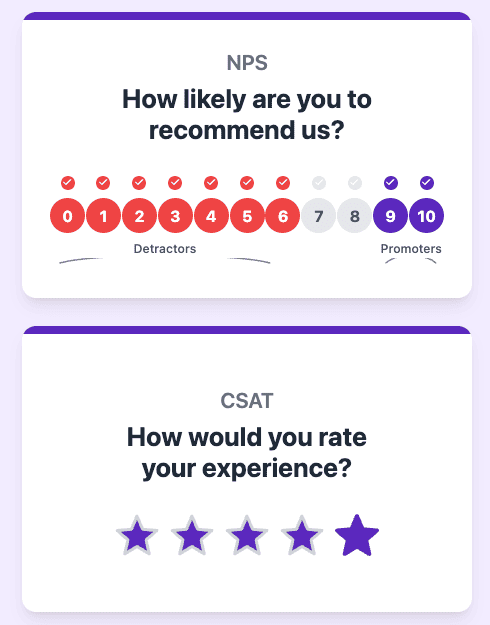
- The Metric: This should be your NPS (Net Promoter Score) or CSAT (Customer Satisfaction).
- The Position: It must be the first question asked. Placing it at the top ensures it captures the guest’s raw, uninfluenced sentiment before they get bogged down in the details of the meal.
- The Format: It must be a Scale (0-10 for NPS, 1-5 for CSAT).
- The Phrasing:
- NPS: “How likely are you to recommend [Restaurant Name] to a friend or colleague?”
- CSAT: “Please rate your overall satisfaction with your experience today.”
Why This Matters:
Unlike the diagnostic questions we will discuss later, the Anchor Question requires a scale to allow for precise benchmarking. A binary “Yes/No” cannot tell you if you are trending slightly up or slightly down week-over-week. The scale provides the necessary granularity to track the overall health of the brand.
Think of this section as the “What.” The rest of the survey is the “Why.” You need the Anchor to provide the score, so the subsequent questions can provide the solution.
But does that number tell your General Manager exactly what to fix during the lunch rush to save the shift? Does it tell your Marketing leadership exactly how to impact that score—identifying which brand lever (value, menu innovation, or service consistency) will actually move the needle next quarter?
And critically, do you know how these metrics map to your financial results? Can you prove to your CFO that a 5-point lift in sentiment actually correlates to a lift in traffic or comp sales?
2. Diagnose AND Score
The “Score” is key, but so is not stopping there.
Operators often rely on broad, high-level metrics that deliver a benchmark for key factors impacting the overall experience (i.e. Service, Food etc.). These look good in a boardroom presentation but often offer zero utility to a General Manager on a Friday night.

Here’s an example of the sort of specificity we’re talking about – and how you move from a score to a diagnosis.
- The Weak Question: “Was your dining experience enjoyable?”
- The Problem: This question generates a sentiment score, but it lacks diagnosis. “Enjoyable” is subjective. If a guest says “No,” you don’t know if the music was too loud, the food was cold, or the server was rude. A score of “6.7 in Accuracy” is useless to a manager because it doesn’t tell them what to fix.
- The Anatomy Fix: Use objective questions to diagnose why the score is what it is.
- The Strong Question: “Did your server check back to make sure that everything was to your satisfaction?”
By anchoring your question to specific steps of restaurant service, you remove ambiguity. The answer becomes binary and clear: either the check-back happened, or it didn’t. This shift allows you to turn vague scores into clear directions so everyone—from the C-Suite to the line cook—knows exactly what to do next.
3. Enforce Simplicity and Directness
Even an objective question fails if the guest has to read it twice. The environment of restaurant service is fast-paced; your survey needs to match that speed. Furthermore, you are trying to reach the “Silent Majority”—the average guests (the 3s and 4s) who usually don’t bother leaving public reviews on Yelp or Google. To capture their valuable data, your barrier to entry must be low.
A critical error in survey design is the “Double-Barreled Question”—asking two things at once.
- The Weak Question: “Did your server greet you promptly and recommend a beverage?”
- The Problem: What if they greeted you promptly but didn’t recommend a drink? The guest is forced to choose which part to answer, polluting your data.
- The Anatomy Fix: One concept per question.
- The Strong Question: “Did your server recommend a specific beverage?”
Keep the language distinct and unadorned. If a question is too complex, guests will skip it.

Simplicity ensures high response rates and accurate data regarding the steps of service you are trying to measure.
Pro Tip
Get Some Inspiration from Our Restaurant Survey Question Bank
4. Scale vs Binary vs Free Text
Once you have established your Anchor, you must decide how to ask the remaining questions. A common point of friction in survey design is determining the right mechanism for the answer: a sliding scale, a simple Yes/No, or an open text box.
Each format serves a distinct purpose in the “Score. Diagnose. Improve.” framework.
A. Use Scales for Sentiment (The “Score”)
Scales (1-5, 0-10) are appropriate when measuring feelings, atmosphere, or the “brand promise”.
Questions like “How would you rate the atmosphere?” require nuance because human emotions have degrees.
However, a score alone is rarely actionable; it tells you how the guest felt, but not why.
 Example Scale Sentiment Questions
- The Anchor (NPS): “How likely are you to recommend us to a friend or colleague?” (0-10)
- Overall Satisfaction (CSAT): “Please rate your overall satisfaction with your experience today.” (1-5)
- Value Perception: “How would you rate the value you received for the price paid?” (1-5)
- Brand Promise: “Did our atmosphere match the vibe you expected?” (1-5)
B. Use Binary for Standards (The “Diagnosis”)
Never use a scale to measure a standard. A step of service either happened, or it didn’t.
The power of binary questions lies in their ability to provide “irrefutable data”. In many restaurant groups, known issues persist for years because internal stakeholders cannot agree on the cause. Operations blames Marketing; Marketing blames Culinary. By using binary questions to track steps of service, you break this internal deadlock. You can prove, without a doubt, that the issue is not the quality of the food (a subjective scale), but the failure to offer it (an objective fact).
This gives you the confidence to make decisions immediately rather than waiting for next quarter’s report.
 Service & Revenue Drivers (Front of House)
- The Upsell: “Did your server recommend a specific appetizer or beverage?” (Yes/No)
- The Greeting: “Were you greeted within 30 seconds of entering?” (Yes/No)
- The Check-Back: “Did a manager or server visit your table to ensure you were satisfied?” (Yes/No)
- The Closing: “Were you offered a dessert or coffee before your check?” (Yes/No)
 Product Execution (Back of House / Culinary)
- Temperature: “Did your food arrive at the table hot?” (Yes/No)
- Accuracy: “Was your order prepared exactly as you requested (e.g., no onions, dressing on side)?” (Yes/No)
- Menu Fidelity: “Did the dish look and taste as described on the menu?” (Yes/No)
C. Use Free Text for Context (The “Voice”)
Including a free-text box feels like a nice gesture, but for most multi-unit operators, it creates a data trap. If you collect 5,000 comments a month but have no way to process them, you are simply hoarding “too much data and not enough answers”.
Open-ended questions are only valuable if you have a system capable of automated analysis—tools that can aggregate comments to find trends like “Salty Fries” appearing 50 times in one week.
If you have the capability to analyze the data, there are two specific situations where a free text question is superior to a button: Service Recovery and Product Discovery.
 Service Recovery (Triggered by Low Score)
- The Setup: Guest rates “Likelihood to Return” as 1-3.
- The Question: “We see that we missed the mark. Please tell us exactly what went wrong so a manager can fix it.”
- The Goal: This acts as a “pressure release valve,” keeping the complaint private (Direct Feedback) rather than public (Yelp/Google).
 Product Discovery (Triggered by Specific Order)
- The Setup: POS data shows the guest ordered the new “Spicy Shrimp” LTO.
- The Question: “We are testing our new Spicy Shrimp dish. Was it too spicy, too mild, or just right? Please tell us what you thought.”
- The Goal: Validates culinary changes with a specific segment before rolling them out system-wide.
Conclusion: From Questions to Sales
The disconnect between a “happy guest” and a “profitable guest” can truly lie in how you ask the question. If your survey score doesn’t match your sales reality, the data isn’t helping you. By restructuring your questions using this anatomy—moving from vague feelings to specific, binary diagnostics—you do more than just measure sentiment; you uncover the specific levers that drive revenue.
Asking the right questions in the right way is the only way to explicitly connect sentiment scores to financial results. It allows you to move beyond simple grades and focus on the specific operational opportunities that actually move the needle on sales and traffic. Ultimately, a great question doesn’t just ask how the guest felt; it illuminates exactly what your team needs to do tomorrow to grow the business.